
To update your connected social media account information on Ainfluencer, follow these steps:
1. Go to Your Profile
Open the Ainfluencer mobile app and navigate to your profile.
2. Select the Social Media Account
Choose the account you want to edit from the list of connected accounts.
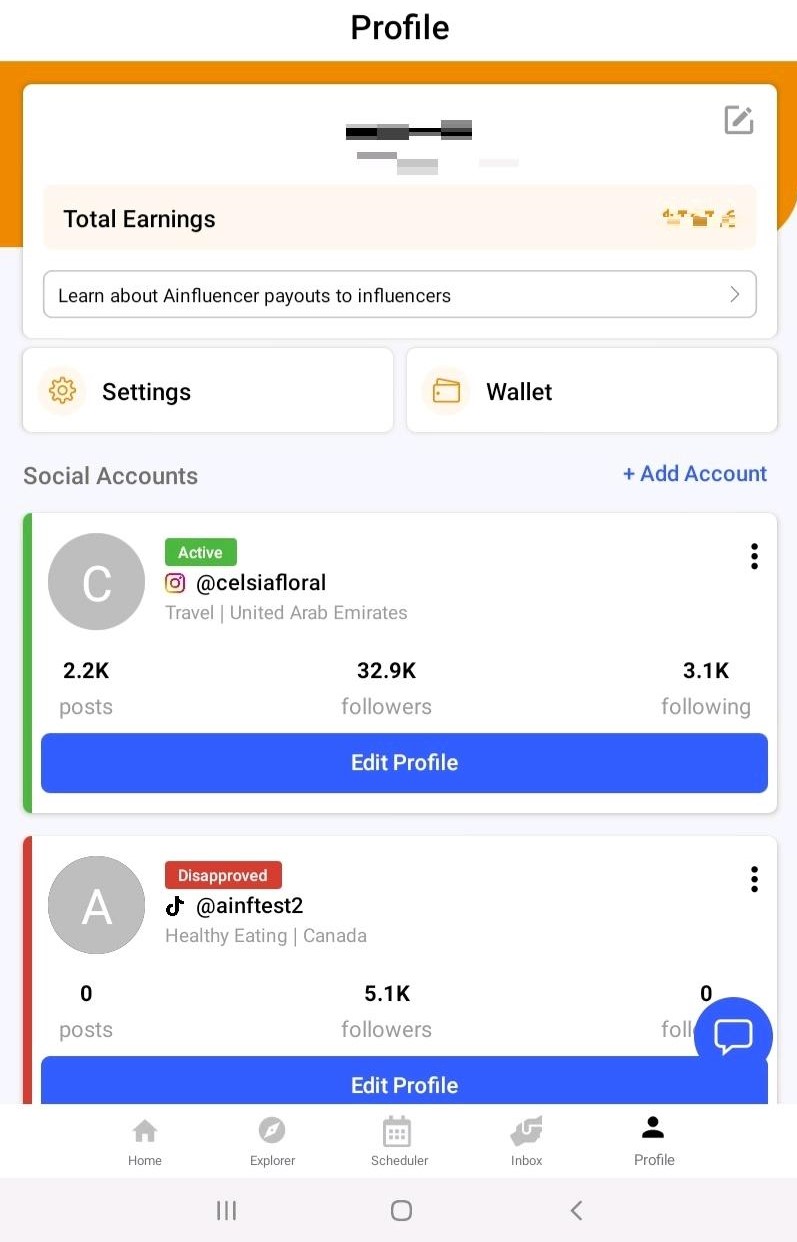
3. Edit Your Profile Information
You can update various details, including:
- Bio: Make changes to reflect your current branding.
- Age: Adjust your age if necessary.
- Gender: Update your gender.
- Location: Add or update up to three locations to specify where you’re active or available for collaborations.
4. Save Your Changes
After making edits, save the changes to update your information successfully.
This keeps your profile accurate and attractive to brands looking for influencers in specific niches or regions!
Keeping your follower count and username current
Profile fields are edited as above, but your username, picture and follower count come from the platform and are refreshed separately:
1
Open Profile and find the account card.
2
Tap the three dots in the top right of the card.
3
Tap Sync with my Instagram.
You can sync once every 24 hours.
Instagram accounts are refreshed automatically about once a month, so recent growth may not show immediately.
If you renamed your account on the platform, sync is the fix. We do not detect the change on our own, which is what causes the incorrect username error.
Important
If an account shows as Archived, that is the same cause gone further: we could no longer find the username at all. Email support with your current username and it can be restored. Archived is not a penalty and nothing was done wrong.
The fields that decide which campaigns you see
| Field | What it controls |
|---|---|
| Categories | Which campaigns you are matched with |
| Location and countries | The filter brands use most. List every country your audience is genuinely in |
| Languages | Whether you appear in language-filtered searches |
| Bio | Read by a brand deciding whether to invite you |
| Insights | What justifies your price. Brands ask before paying |
Good to know
Update these when your audience shifts, not only when you rebrand. Your audience country mix in particular changes who you are matched with, and stale fields quietly keep you in the wrong searches.
Why this helps you
Every field here is a filter a brand actually uses, which is why keeping them current is worth more than any other profile work. An accurate profile is doing sales for you while you are not looking.