
To add past collaborations on Ainfluencer, follow these steps:
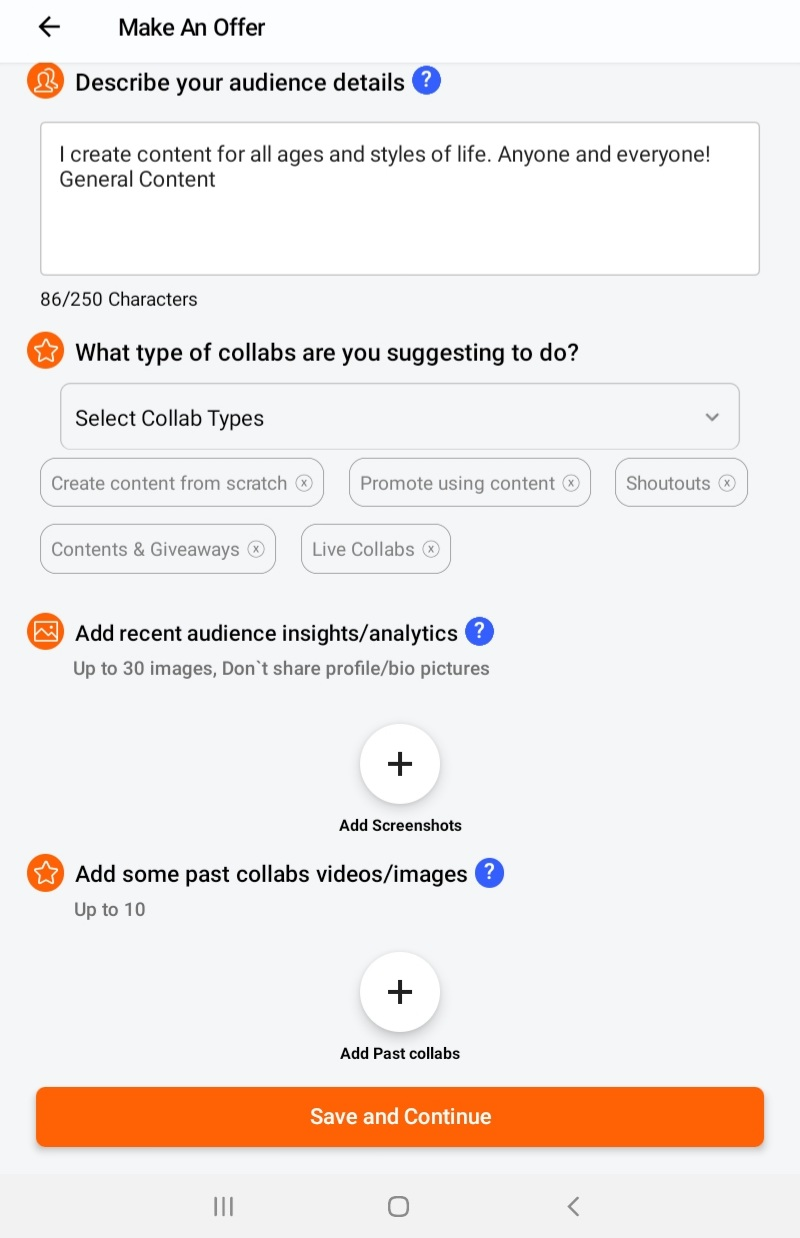
- Log into Your Ainfluencer Account and go to your profile.
- Navigate to the Offer Submission Page while making an offer to a brand.
- Find the “Past Collaborations” Section and upload up to 10 videos or images showcasing your previous work.
- Include Key Information, such as:
- Brand names you’ve worked with
- Type of collaboration (e.g., sponsored posts, product reviews)
- Links to previous work (if applicable)
- Performance metrics (e.g., engagement rate, reach)
- Submit Your Offer after filling out the required details.
Adding past collaborations helps brands assess your experience and increases your chances of securing deals.
What to put in, and what brands actually look at
| What you add | Why it matters |
|---|---|
| The content itself | Up to 10 images or videos. This is the first thing a brand opens |
| Brand names | A recognisable name does more work than any description |
| The type of collaboration | A reel, a review and an unboxing are different skills |
| Results | Reach, views and engagement. A real number beats an adjective |
| A link to the live post | Lets a brand check it themselves, which is the strongest proof there is |
Good to know
Pick your five best, not your ten most recent. A brand judges you on the weakest piece in the set, so one filler item lowers the whole impression.
If you have no past collaborations yet
Use your own best organic content. A brand wants to see how you shoot and talk, not proof that someone paid you.
Make a spec piece for a product you already use. It shows the format you would deliver.
Keep your insights current instead. With no track record, audience data is what carries the decision.
Important
Only post work that is genuinely yours. Brands do check the links, and a borrowed example that does not match your account is the fastest way to lose a deal you would otherwise have won.
Why this helps you
Past collaborations are the single highest leverage part of an offer, because they answer the one question a brand cannot answer from follower counts: whether you can actually make the thing.