
Each tab on the “Explore” page helps you filter campaigns based on different criteria:
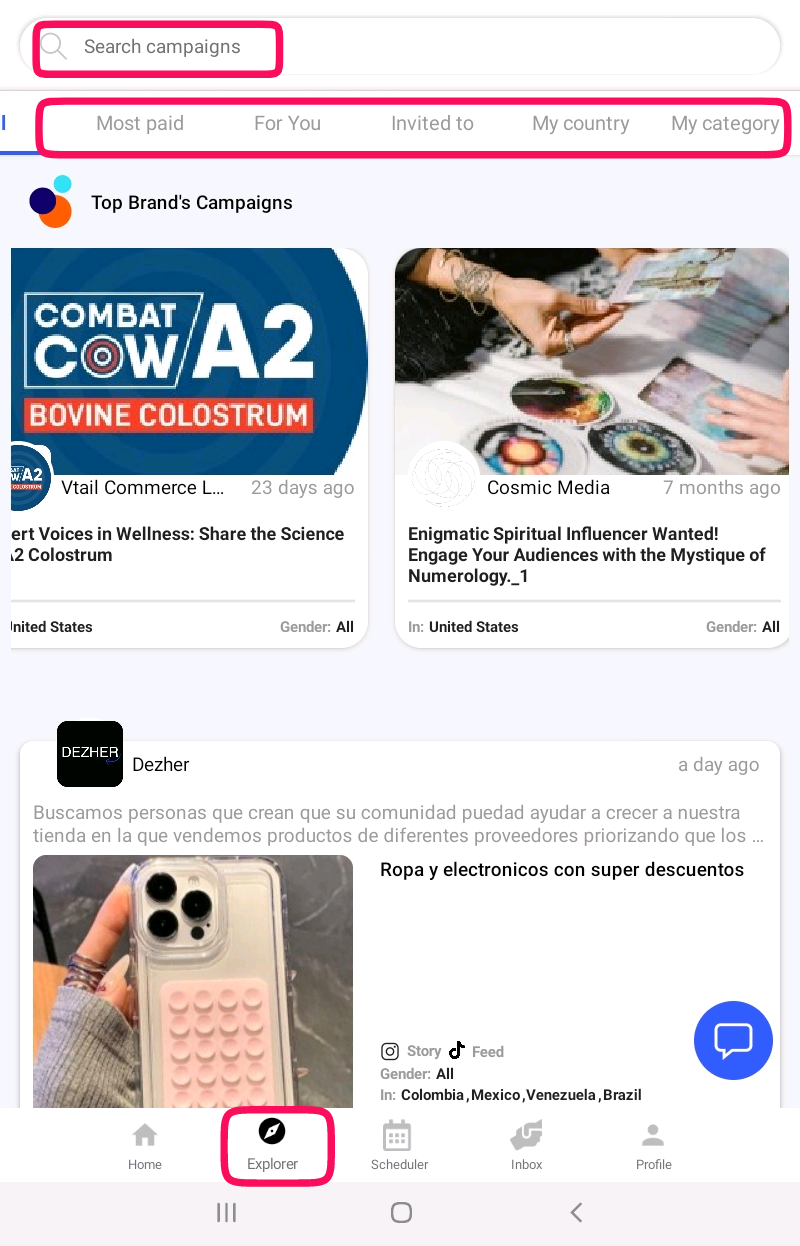
- All – Displays every available campaign on Ainfluencer, giving you the widest range of opportunities to browse.
- Most Paid – Highlights the highest-paying campaigns, allowing you to prioritize offers with better compensation.
- For You – Shows campaigns that match your profile, niche, and audience, making it easier to find relevant collaborations.
- Invited To – Lists campaigns where brands have specifically invited you to participate. If you receive an invite, you’ll also get an email notification.
- My Country – Displays campaigns specifically available in your country, ensuring relevance based on location.
- My Category – Filters campaigns based on your selected niche or industry, helping you find opportunities that align with your content and expertise.
Use these tabs to quickly find and apply for campaigns that best suit your profile and maximize your earning potential.
Which tab to open first
| Tab | Open it when | Why it matters |
|---|---|---|
| Invited To | Always, first | A brand already looked at your profile and chose you. Far better odds than a cold offer |
| Newest | Daily | Brands read offers in the order they arrive and often stop once they have enough |
| For You | When you want relevance | Matched on your categories and audience |
| Most Paid | When filtering by budget | Check the deliverable too; a high price can be a big job |
| My Country | Always worth checking | Country is the filter brands use most |
| My Category | When your niche is specific | Your niche |
| All | When the others are thin | Everything live, unfiltered |
Good to know
Being early beats being perfect. A thoughtful offer sent on the first day of a campaign beats a flawless one sent on the tenth, because brands close campaigns once they have enough good offers.
Before you offer, check these in the brief
The deliverable. A reel is not a story and is not a feed post.
The target country. A mismatch here is the most common reason a good creator is passed over.
Whether a product is shipped to you, and whether you want it.
The date. Offer one you can genuinely hit, and remember you can extend it once later without the brand’s permission.
Important
If the Explorer looks empty, check your account status. An account in Draft cannot browse or apply to campaigns at all. Open Profile and tap Complete Profile.
There is no limit on how many campaigns you can offer on at once, and nothing is charged for applying. The only real limit is what you can deliver if they are all accepted.
Why this helps you
The filters turn an endless feed into a short list you can act on in ten minutes, which is the difference between browsing the marketplace and actually working it.