
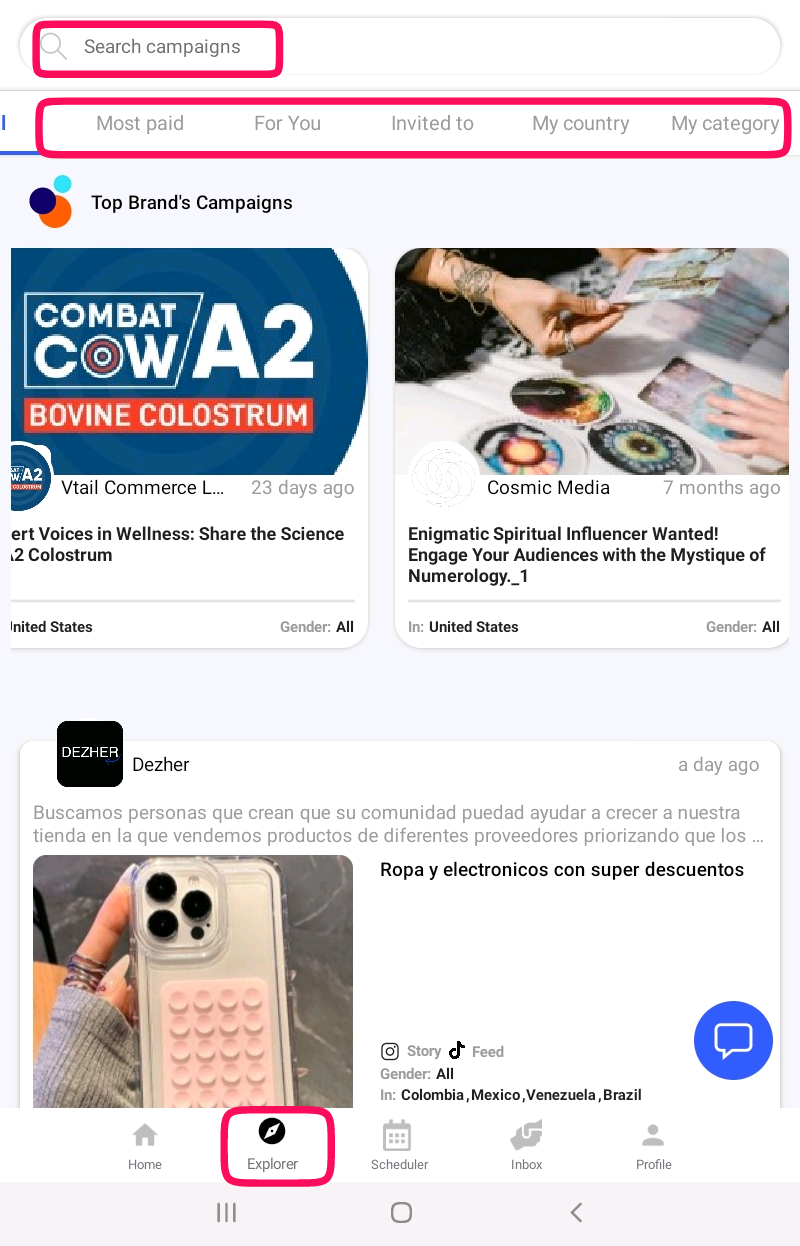
- At the top of your feed, you’ll find Top Brand Campaigns, showcasing premium opportunities from leading brands.
- Below this, the Newest Campaigns section highlights the latest collaborations added to the platform.
- Campaigns are organized by niche, making it easy to find opportunities that suit your expertise or audience.
- At the top of the feed, the Search Campaigns Bar helps you find campaigns by specific topics or keywords, allowing you to quickly locate relevant collaborations
- Below the search bar, tabs like Most Paid, For You, Invited To, My Country, and My Category provide additional filtering options, helping you discover highly targeted campaigns based on your preferences, location, or niche.
Browse through the campaigns, use these tools to narrow down your search, and send offers to brands directly through the app. This intuitive process ensures you can efficiently find and apply for the most relevant opportunities.
The tabs, and what each one is actually for
| Tab | Use it when |
|---|---|
| Top Brand Campaigns | You want recognised brands. Usually larger budgets |
| Newest Campaigns | You want to be early. Being among the first offers matters |
| Most Paid | You are filtering by budget |
| For You | Matched to your categories and audience |
| Invited To | Check this first. A brand has already asked for you |
| My Country | Campaigns targeting where your audience is |
| My Category | Campaigns in your niche |
Good to know
Open Invited To before anything else. An invitation means a brand already looked at your profile and wants you. The conversion rate on those is far higher than on an offer you send cold.
Being early is worth more than being perfect
Brands read offers in the order they arrive and often close a campaign once they have enough good ones. A thoughtful offer sent on the first day beats a flawless one sent on the tenth.
Important
You cannot browse campaigns at all while your account is in Draft. If the Explorer looks empty, check your account status on your profile first. See campaigns and draft mode.
Read the campaign before you offer
Check the deliverable. A reel is not a story and is not a feed post.
Check the country. If the campaign targets a country your audience is not in, you are unlikely to be picked.
Check whether a product is shipped and whether you are willing to receive it.
Check the date. Offer a delivery date you can actually hit.
Why this helps you
The filters exist because a marketplace with thousands of campaigns is useless without them. Using My Category and My Country properly turns an endless feed into a short list you can act on in ten minutes.